Motionary9 min read
React Native background tasks that survive the user leaving
iOS 26 and Android will both keep a user-initiated task running after your app is backgrounded — and both will kill it if you get the details wrong. What the shipping SDKs actually say.
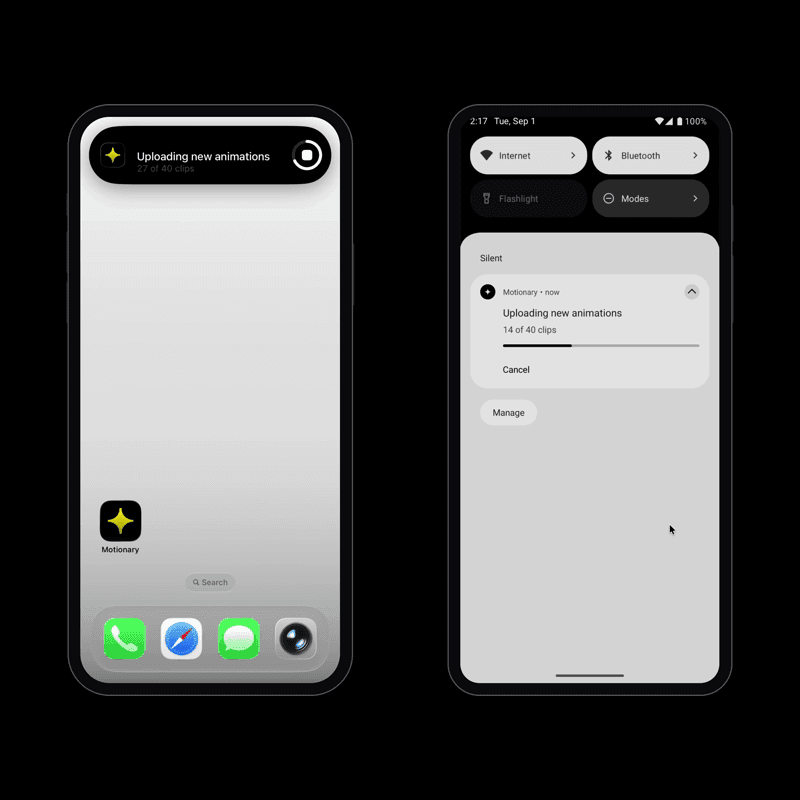
A user taps Export on four hundred photos, watches the bar move for three seconds, then switches to Messages. On most React Native apps the work stops there. The JavaScript thread is suspended, the upload is half finished, and when they come back there is nothing to resume from — not even a record that it was running.
Both platforms now have a real answer to this, and both hand it out on
conditions. iOS 26 added BGContinuedProcessingTask, which keeps
your app alive and draws a Live Activity the user can watch and cancel.
Android has had WorkManager foreground services for years. Neither is a
general "run some code later" mechanism, and the conditions they impose are
the whole story.
What happens to a task when the user leaves the app?
Nothing good, by default. iOS suspends your process within seconds of
backgrounding. Android is more forgiving but will eventually kill a
background process under memory pressure. A setTimeout loop, a
fetch chain, a JS-driven encoder — all stop mid-flight.
The older iOS APIs do not help here. BGProcessingTask and
BGAppRefreshTask are deferrable: you ask the system to
run something eventually, it decides when, and the user is never told. That
is right for a nightly sync and wrong for work someone is waiting on.
The distinction that matters is not background versus foreground. It is whether the user just asked for this, and is waiting.
How do you keep a task running in the background on iOS 26?
Submit a BGContinuedProcessingTaskRequest. The system starts it
immediately — not later — and shows a Live Activity carrying your title,
subtitle and progress, with a control to cancel.
let request = BGContinuedProcessingTaskRequest(
  identifier: "com.foo.MyApp.export.\(UUID().uuidString)",
  title: "Exporting library",
  subtitle: "0 of 400 photos"
)
request.strategy = .queue
try BGTaskScheduler.shared.submit(request)
Four rules come with it, and each one is load-bearing.
Submission must follow a user action. Apple's wording is that it "needs to occur as a result of a person's action, such as tapping a button." Submit from a timer or a push handler and the task is cancelled.
The identifier is a wildcard expansion. Put
com.foo.MyApp.export.* in
BGTaskSchedulerPermittedIdentifiers, then register and submit a
concrete com.foo.MyApp.export.<uuid>. The prefix must start
with your bundle ID. Get this wrong and every submission fails with
.notPermitted, which is also what you get for four unrelated
reasons — so it is worth validating before you call the scheduler.
Register each identifier exactly once. From the header:
"The system kills the app on the second registration of the same task
identifier." Not an exception you can catch — the app dies. If you use
per-job identifiers, you need a process-wide set of what you have already
registered, because BGTaskScheduler offers no way to ask.
Report progress or be killed. More on that below.
Why is progress reporting not optional?
BGContinuedProcessingTask conforms to
NSProgressReporting, and the header is blunt about what happens
if you ignore it: "Tasks that do not report any progress will be
expired."
This is the single most important line in the API. A task that does its work quietly and reports at the end will be deprioritised and then killed before it gets there. Progress is not decoration on the Live Activity; it is the heartbeat that keeps the task alive.
task.progress.totalUnitCount = 400
task.progress.completedUnitCount = Int64(done)
task.updateTitle("Exporting library", subtitle: "\(done) of 400 photos")
Note that updateTitle takes both values every time. There is no
API for changing the subtitle alone, so you pass the current title back in.
What happens when the user swipes your app away?
This is the case that quietly corrupts data, and it is worth reading the documentation twice. When the user removes the app from the app switcher, iOS cancels the task and — verbatim — "the app doesn't receive an indication of cancellation in that case."
No stop callback. No expiration handler. Your half-written export file is simply there the next time the app launches, with nothing to say it is incomplete.
The only defence is to persist a record natively at submit time and read it back on launch. Anything you keep in JavaScript state dies with the process, and anything you write from a completion handler never runs.
useEffect(() => {
  ContinuedTasks.getKnownTasks().then(async (tasks) => {
    const orphans = tasks.filter((t) => t.stopReason === 'app-terminated');
    for (const orphan of orphans) {
      await rollBackPartialExport(orphan.id, orphan.completedUnitCount);
    }
    await ContinuedTasks.forgetTasks(orphans.map((t) => t.id));
  });
}, []);
Why doesn't the WWDC sample code compile?
If you follow along with WWDC25 session 227, the code will not build against the shipping SDK. Watch it for the behaviour — the Journal app demo is exactly what the API feels like — and get the signatures from the headers instead.
Three things worth knowing, all verified against the iOS 26.5 SDK that ships with Xcode 26.5:
-
There is no
.defaultresource value in Swift.BGContinuedProcessingTaskRequestResourcesDefaultis0and carries noNS_SWIFT_NAME, and Swift's importer drops zero-valuedNS_OPTIONSmembers. The empty option set[]is the only spelling. -
The submission strategy's zero value is not its default.
The enum is declared
Fail = 0,Queue = 1, but the property documents its default asQueue. Leavingstrategyalone and assuming you get the documented default is a bug; set it explicitly. -
No
UIBackgroundModesvalue is required.BGProcessingTask's header says it needsprocessingandBGAppRefreshTask's saysfetch.BGContinuedProcessingTask's says nothing — it is the only one of the three without that sentence.
One more, if you want background GPU access: the entitlement
com.apple.developer.background-tasks.continued-processing.gpu is
valid only for paid Apple Developer Program teams. On a free personal team the
build will not sign at all, which is a confusing failure to hit while you are
trying to test something else entirely.
How does the same thing work on Android?
A WorkManager CoroutineWorker that calls
setForeground() from inside doWork(). That last
detail matters: getForegroundInfo() alone is the
expedited path, and a CoroutineWorker that does not call
setForeground is capped at ten minutes.
class UploadWorker(ctx: Context, params: WorkerParameters) :
  CoroutineWorker(ctx, params) {

  override suspend fun doWork(): Result {
    setForeground(foregroundInfo(0))
    // ...
  }
}
Three traps follow. getForegroundInfoAsync() and
onStopped() are final on
CoroutineWorker, so you override the suspending
getForegroundInfo() and use coroutine cancellation as your stop
signal. WorkManager declares SystemForegroundService in its own
manifest but not a foregroundServiceType, so you merge one in
with tools:node="merge". And on Android 13+ you must request
POST_NOTIFICATIONS at runtime — without it the service starts and
the work runs, but the notification is silently suppressed, so the whole thing
looks like it did nothing.
The stop reasons are not what you would guess
WorkInfo reports why a worker was stopped, and two of the
constants are negative:
STOP_REASON_FOREGROUND_SERVICE_TIMEOUT is -128 and
STOP_REASON_UNKNOWN is -512. Anyone hardcoding a
positive integer there — and the number is easy to assume — has written a
branch that never runs.
The timeout one matters on Android 15 and later, where all of an app's
dataSync foreground services share a budget of six hours per
twenty-four. At the limit the system calls
Service.onTimeout and you have seconds. On Android 16, JobScheduler
quota also applies to work running alongside a foreground service, arriving as
STOP_REASON_QUOTA.
Can iOS tell you the user cancelled?
No, and this is the asymmetry to design around. iOS delivers user
cancellation and system expiry through the same zero-argument
expirationHandler. There is nothing to distinguish them, so an
honest wrapper reports expiry and says so rather than guessing.
Android can tell them apart, and reports the cancel action on the notification as a distinct user cancellation. If your app needs to behave differently for "the user stopped this" versus "the system stopped this", that logic can only be exact on one of the two platforms.
Doing it once, for both
All of the above is why react-native-continued-task exists: one typed API over both, with the constraints surfaced rather than hidden. Swift and Kotlin through Nitro Modules, an Expo config plugin for the plist and manifest wiring.
import { ContinuedTasks } from 'react-native-continued-task';

const task = await ContinuedTasks.submit({
  identifierPrefix: 'com.foo.MyApp.export',
  title: 'Exporting library',
  subtitle: `0 of ${photos.length} photos`,
  totalUnitCount: photos.length,
});

task.addOnStopListener(({ reason, native }) => {
  console.log(reason, native.domain, native.name);
});

for (const [index, photo] of photos.entries()) {
  await exportOne(photo);
  task.setProgress(index + 1, photos.length);
}
task.complete(true);
totalUnitCount is required at submit rather than optional,
because a task that never reports progress is a task the system will kill.
Stop reasons carry the raw platform domain and code alongside the mapped
name, because a collapsed enum makes these APIs impossible to debug from a
user's report.
How do you test any of this?
Mostly, you cannot — not automatically. BGTaskScheduler returns
.unavailable on the iOS Simulator, so nothing about the iOS path
can run in CI. Apple's debug SPI for triggering tasks is device-only and is
grounds for App Store rejection in a shipping build.
The good news is that you do not need that SPI. Unlike
BGAppRefreshTask, a continued processing task starts immediately
on submission — so device testing is just building to a real iPhone and
tapping the button. Android is easier: the emulator runs a real foreground
service, so the notification, the cancel action and the worker lifecycle can
all be covered by instrumented tests.
What cannot be automated on either platform is the swipe. No test can remove an app from the app switcher, which means the reconciliation path — the one that protects your users' data — is verified by a human or not at all.
How do you run a background task in React Native?
For work the user just started and is waiting on, use iOS 26's
BGContinuedProcessingTask and an Android WorkManager foreground
service. Both keep your process alive after the app is backgrounded and show
the user progress they can cancel. Submit only in response to a tap, report
progress continuously, and persist a record so work interrupted by the app
being killed can be reconciled on the next launch. For deferrable work with no
user waiting — a nightly sync — use BGProcessingTask or
expo-background-task instead.
Does BGContinuedProcessingTask work in the iOS Simulator?
No. BGTaskScheduler returns the .unavailable error
on the Simulator, which Apple documents in the SDK header. Every submission
fails there. You need a physical device running iOS 26 or newer, and because
a continued processing task starts immediately on submission rather than being
scheduled for later, testing on device is simply a matter of tapping the
button that submits it.
How long can an iOS background task run?
Apple does not publish a maximum duration for continued processing tasks, nor
a limit on how many can run at once. The "one refresh and ten processing
tasks" figure in BGTaskScheduler's documentation is about a
different task type and does not apply. On Android the relevant limit is
documented: from Android 15, all of an app's dataSync foreground
services share six hours per twenty-four-hour period, and the budget resets
when the user next brings the app to the foreground.
Why does my Android foreground service notification not appear?
Almost always the runtime notification permission. Declaring
POST_NOTIFICATIONS in the manifest is not enough on Android 13
and later — without a runtime grant the foreground service still starts and
the work still runs, but the notification is suppressed, so the task looks
like it did nothing at all. Request it with
PermissionsAndroid.request before your first submission.
What happens to background work when the user force-quits the app?
On iOS the task is cancelled and your app is given no indication of it — no stop callback and no expiration handler run. The only way to detect it is to persist a record when the task is submitted and check it on the next launch; anything held in JavaScript state is gone with the process. On Android a WorkManager worker can outlive the app process, so the work may genuinely still be running and can be re-attached to.
The short version
- Submit from a tap, never from a timer or a push handler.
- Report progress continuously — on iOS it is what keeps the task alive.
- Register each task identifier once; a second registration kills the app.
- Persist a record at submit time, and reconcile on launch. The swipe-away case reports itself no other way.
- Read the headers, not the session slides.
React NativeExpoiOSAndroidBackground TasksNitro Modules


